See exactly how CasinoAutoPlay automates your workflow in a few simple steps
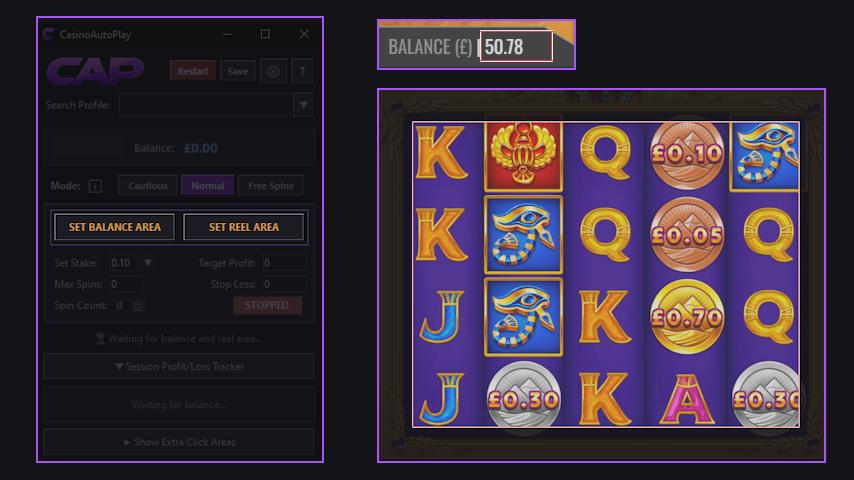
Press the Balance and Reel Area buttons and use left click and drag to draw a box over your in-game balance and reel areas.
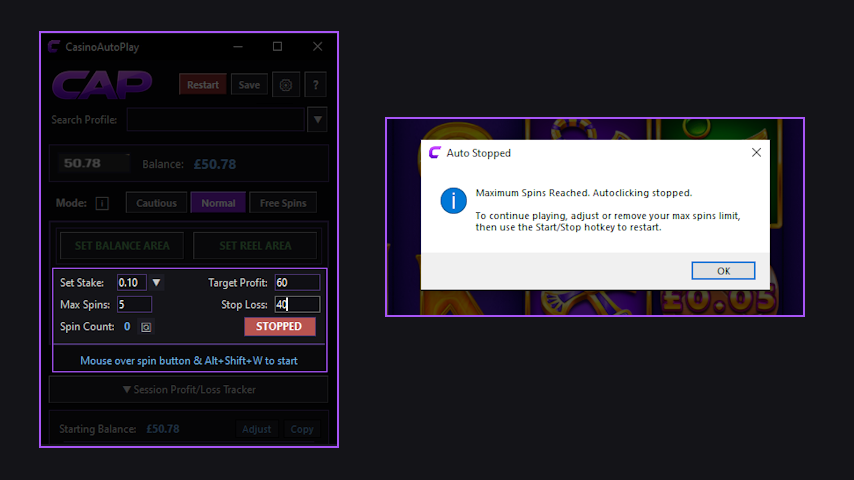
Set your Stake Size and then either your Max Spins, Target Profit or Stop Loss. Place your mouse cursor over the spin button and press the hotkey to start. CAP will immediately begin to analyse your game and self-calibrate — no additional input is needed from you as the user. CAP will stop as soon as one of your targets is reached.
If you wish, you can set up extra click areas that will only fire off when CAP detects an interruption in the normal flow, preventing it from getting stuck. Set up once and they will be automated from that point onwards.
Once you have set your Balance Area, Reel Area, Stake Size, Max Spins, Target Profit, Stop Loss or Extra Click Areas, just hit the "Save" button and name your profile. CAP will remember all of these settings — so next time you run the same setup, just load your profile in 2 clicks and press the hotkey to start.
This feature makes offers that you visit day in/day out a breeze. A genuinely huge time saver for serious advantage players with a busy workload.
For those who are completing offers on a daily basis, keeping tight records and managing your bankroll is essential. But the time taken using calculators and typing figures into spreadsheets manually adds up.
CAP helps to get a little of this time back by displaying your Starting Balance, Ending Balance, Profit & Loss and Running Totals — providing you with a handy "Copy" button to make updating your spreadsheets a little easier. Also, if you need to make a deposit or withdrawal mid-session, you can adjust these figures in the app so that they stay accurate.
CAP has a dedicated mode for playing through promotional rewards at maximum speed. CAP will automatically stop when you have 1 action remaining, ensuring that it doesn't continue clicking beyond the reward allocation.
Every target application behaves differently, and this is where most automation tools fall apart. There is so much variety from one to the next that each one presents different challenges and necessitates behaviour changes from the automation software. This is why many generic tools fail in key areas such as:
CAP has solved these issues. It spends the first few clicks operating safely whilst analysing the target behaviour in the background. It then uses complex logic to ensure that it self-calibrates to run in the fastest, safest way possible.
In short, CAP was designed to be your go-to automation tool for matched betting offer completion.
Here are a few words from the developer.
Hey guys! Thanks for visiting the page and checking out CAP. If you've already tried it, I hope you love it. If you haven't yet, I'm confident you'll see the difference.
Like many people who are probably on this page, I built this tool because I needed it. I've done thousands of offers, and without reliable automation it can be a tedious job.
Back in mid 2024 I tried everything — general automation tools like AutoHotkey and MiniMouse Macro, and more specific ones like Ollie's AutoClicker. None of them cut it. General tools required constant babysitting because all they do is click non-stop, and Ollie's (although a great free tool) just didn't work across the board or count clicks reliably. I was still stuck clicking my mouse with one hand and counting with a clicker in the other.
There was nothing out there that did what I needed, paid or unpaid, so I set out to build my own. My initial goals were simple: A) count clicks accurately and B) work across all scenarios. I had no idea those two small requirements would take as many hours as they did.
After a long development process, I got something working across a large variety of scenarios. Along the way I kept adding features that made life easier — and eventually realised this could help a lot of other people too. But it was a complicated app with a myriad of settings, making it hard to use without inner knowledge of how the back end worked.
So I took time off work and redesigned the whole thing with a clear goal: remove all the complexity and make an app that counts clicks reliably, works everywhere, and requires almost zero input from the user. After thousands of hours of testing, data collection and custom solutions — CAP is the result.
Please, use the free trial and give this app a good run out. Use all the features and see how much time it can save you too. I hope this benefits you as much as it has benefited me.
Rob
Start your free 14-day trial of CAP Basic. No credit card required.
Start Free 14-Day Trial