Home How It Works Download Support Login
For Casino Advantage Players

The Smart Slots Auto Clicker.

Reads the game, plays your spins, and stops the moment your target hits. Make your casino offers easier.

  • 10-second setup per game
  • Set max spins, target profit, and stop loss
  • Auto-stops the second your target hits
  • Plays through bonus rounds hands-free
  • Tracks your balance in real time
  • Save profiles for every game and offer
  • Multiple safeguards — no runaway clicking

No card details required · Windows 10+
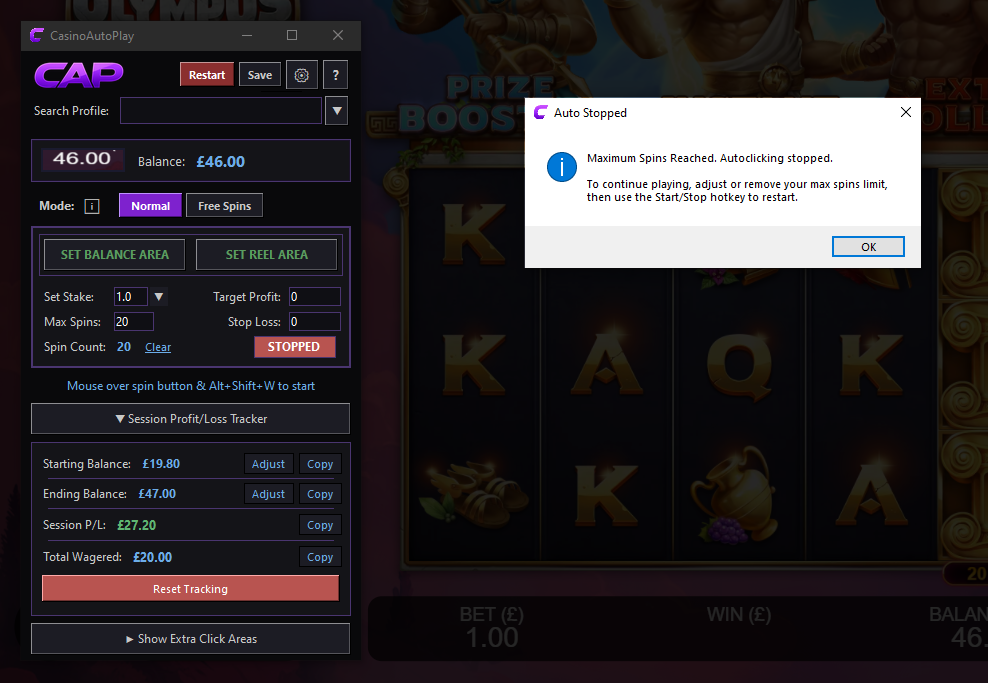
CasinoAutoPlay slots auto clicker interface showing real-time balance tracking, spin counts, and target settings
Built by an advantage player, for advantage players UK Limited Company Stripe-secured payments

CAP vs Other Auto Clickers

Other Auto Clickers

  • Click blindly with no awareness of what's happening
  • No counting, no targets, no auto-stop
  • No safeguards against runaway clicking
  • Tedious manual setup for every scenario
  • You still have to track balance and counts yourself

CasinoAutoPlay

  • Reads your screen and reacts to what's happening
  • Counts every spin and stops at your target
  • Multiple safeguards built in by default
  • Save a profile per game and reload in seconds
  • Tracks balance, profit and loss automatically

Frequently Asked Questions

The questions we get asked most.

What does CasinoAutoPlay actually do?

CAP is a smart casino auto clicker for Windows that handles the repetitive clicking involved in completing casino slot offers. You set a target (a number of spins, a profit goal, or a stop-loss), and CAP plays the slot for you while reading your balance and spin count from the screen in real time. The moment your target hits, it stops automatically.

How is it different from a normal auto clicker?

Normal auto clickers do one thing: click. They have no idea what's on your screen, no concept of when to stop, and no safeguards. If something goes wrong, they keep clicking.

CAP reads what's actually happening on screen, counts every action, watches your balance, and stops the moment your conditions are met. It was designed specifically for Casino Advantage Players that need to adhere to strict rules (such as number of spins played) in order to get casino rewards and be profitable.

What casinos and games does it work with?

CAP works on the slot itself (or rather the image of the slot on your screen), not the casino site itself. So it's compatible with almost any standard slot games out there, on any site. It is 100% local software that interacts directly only with your own device, so there's no per-casino integration to worry about.

Will it work on my computer?

If you're running Windows 10 or later (64-bit) on a reasonably modern PC, yes. CAP is a lightweight desktop application that doesn't need a high-end machine. Full system requirements are below.

What happens after my 14-day free trial?

Nothing automatic. You sign up for the trial without giving any card details, so there's no surprise charge at the end. If you want to keep using CAP after the trial, you choose a subscription length that suits you. If you don't, CAP simply stops working — no recurring charges, no awkward cancellation flows.

Still got questions?

The best way to find out if CAP is right for you is to try it.

System Requirements

Lightweight — runs on most modern Windows PCs

Recommended for smooth performance

2.0GHz+ processor · 8GB RAM · 1920x1080 display

Try CAP free for 14 days.

No card details. No commitment. Just smarter automation.

Windows 10+ · Cancel any time